
Internal Tooling

I love creating internal tools because they present an opportunity to provide clear and measurable ROI from the design team. No sales, marketing, or competitors to influence the outcome – just a problem that needs a solution.

A vast number of our critical workflows depend on internal tools to increase in frequency and scale, and we are constantly adding more or improving upon existing tools. Basically every site audit possible is automated for our team so they always know where each site stands in terms of SEO, technical performance, content freshness, ADA compliance, and much more.

More recently, we’ve shifted into designing markdown skill files for our employees to use with Claude and other generative AI models. These skills help improve and conform the outputs our teams produce when using AI tools in their everyday tasks. Not only do these skills help improve productivity, but we are also able to ensure optimal token usage across the organization, keeping costs at a minimum.

Below are a few internal tools I helped develop while at Treatspace, contact me for examples of more complex, proprietary tools.
Content Block Bounty Board

Quick Win: Steady flow of new content blocks for our website builder that align with the true needs of our platform and customers.

After completely rebuilding our website editor, only a fraction of our old content blocks made the cut – many were outdated or difficult to use. We had ~50 blocks ready for internal use, but an end goal of 500 blocks before bringing customers into the builder. In order to hit our deadlines, we needed each designer to come up with at least 3 blocks/month. We also needed a diverse mix of blocks that were up to standard.

To help push this effort, we released an internal leaderboard where each member of the team could claim block ideas and submit them for points – each member needing to hit 100 points per month. This allowed us to control the balance of blocks coming in based on the density of the category. New block ideas would be scored according to our needs.

Our bounty board was created internally, but also as an iframe that could be plugged into task tracking software like Monday. In addition to this board, we also created a generative AI workflow to bring these blocks to life in about 1 hour.

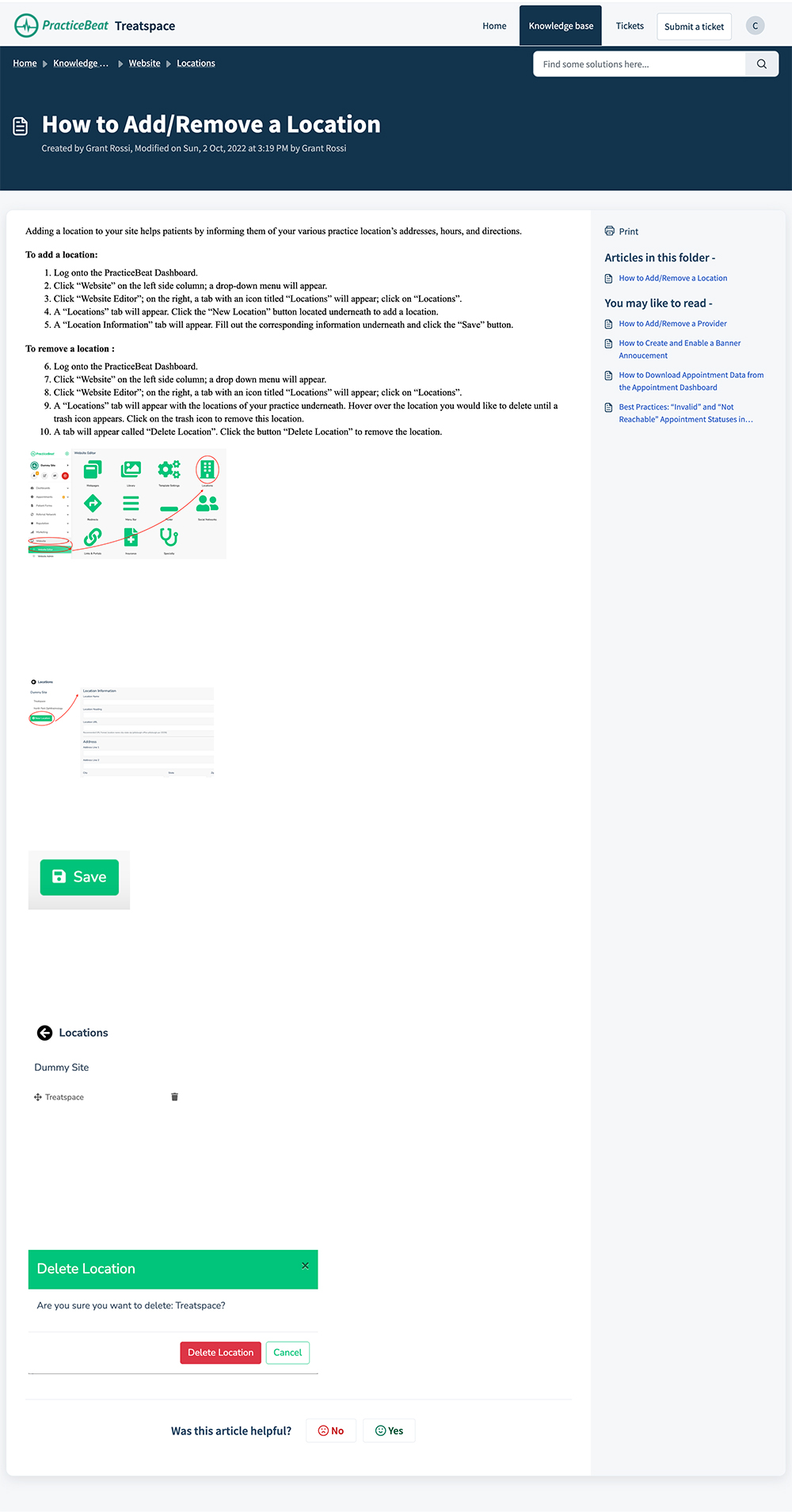
Automated Support Articles

Quick Win: A real path forward to modernizing our knowledge base, created without disrupting everyday workflows, and documentation that can be effectively leveraged by machine learning.

When I started working on product at Treatspace, the platform’s knowledge base was incomplete and outdated, and most of the articles were done in haste to quickly help a customer. Bandwidth constraints also made it hard for the most qualified people to help get everything fixed.

I started this effort with a new outline proposal that was approved by the customer-facing teams. The project would consist of a public knowledge base and a private collection of internal documentation – both would ultimately be used to train AI assistants using the Freshworks API. Categories within the knowledge base were assigned out to the most qualified team with a monthly quota.

My last and most impactful contribution to this project was a Claude plugin for our employees to run during relevant workflows. The user simply tells Claude they are ready to “make a help desk article on [a topic]” and claude will record them doing that task. Once finished, Claude outputs HTML for the user to paste into a new article.

Markdown & Skill Files

Quick Win: More effective tooling, increased productivity, and output conformity for a company that is heavily invested in generative AI.

Markdown files have become the life blood of any company integrating AI into their workflows. It’s reached a point where if you are not using optimized markdown files to set the scope of a prompt, you’re often using more tokens for a generic output.

Our product team was responsible for creating the Claude skill files our employees used on an everyday basis – things like technical & SEO optimizations, indexing audits, building prototypes, and more. Here are some examples:

treatspace-desktop-designer
This skill uses our figma design system and dashboard codebase to build live HTML prototypes for new dashboard features or redesigns.
treatspace-mobile-designer
This skill uses our figma design system and mobile app codebase to build live Flutter prototypes for new app features or redesigns.
treatspace-figma-designer
Trained extensively on our figma component library, this skill will take designs converted from HTML and replace generic elements with components and variables from our design system library.
pb-block-builder
This skill is capable of taking a Figma frame, screenshot, HTML snippet, or URL + selectors, and a description, and creating a working HTML prototype that is compatible with our platform. It also designs the block settings UI for the builder.
pb-accessibility-report
Runs a customer website through an extensive ADA audit and scores them based on our WCAG & best practice standards, giving an overall score and action plan to fix issues.
pb-redirects
Compares an old customer sitemap to our new sitemap and maps redirects with a confidence score and writes a .csv file to upload once the redirects are validated.

Customer Link Generator

Quick Win: Making a complex web of query parameter functionality accessible to our teams and customers.

If not properly documented, query parameters can be a nightmare for front-end users, and a huge disappointment to the developers that program the functionality around them.

Our appointment and feedback forms can pre-select fields for individual doctors or locations, our user tracking covers UTM parameters, and some parameters can alter the content on the page (ex. language). These features were almost never used because it was too much work to produce the correct link.

I created this link generation tool for the teams that needed it, and we eventually moved it into our marketing & website dashboards.
